
Listing tiers
Skinport
Check the applicable sale tier, item custody and payout requirements for a listing.
Open SkinportSelling CS2 skins
Shortlist a selling venue only after confirming that you can receive its payout. Then compare a real buyer or available immediate quote with a realistic listing exit, after sale, withdrawal and conversion costs. The highest ask and the lowest advertised fee are both incomplete answers.
A listing is what a seller asks. A bid or immediate offer expresses demand under its own conditions. A completed comparable sale is useful evidence about a past transaction. Record which one you have; treating them as interchangeable can overvalue a whole inventory.
For a rare float, seed, phase or applied craft, compare the exact attributes. The cheapest ordinary variant gives a base price but not its collectible premium. If an automated quote does not recognize that premium, compare patient individual listings before deciding how much convenience is worth.
| Situation | Useful route to compare | Unfinished question |
|---|---|---|
| Money needed soon | An available item-specific immediate offer | When do those proceeds actually settle and arrive? |
| Can wait for an appropriate buyer | A competitive inspected listing | Are equivalent items selling, or only being listed? |
| Several copies to sell | Demand at multiple prices and quantities | Can all copies clear at the quoted top price? |
| Special craft or pattern | Attribute-matched offers and transactions | Does this buyer pay the premium? |
Skinport's 18 July 2025 announcement gives standard, qualifying high-value and private-sale tiers. DMarket's 2 March 2026 fee page gives usual CS2 selling rates of 2–10% by liquidity, separate from trading. A special tier has conditions: confirm them for your listing instead of applying the smallest headline to every item.
CSFloat's dated fee announcement distinguishes sale commission from a volume-dependent withdrawal charge. It is useful for understanding the two stages; the rate shown in your account is the one that applies. In our comparison tool, the largest result is a calculation, not a buyer.
Example: A offers $200 now, with a 2% sale charge, 2% payout charge on the remaining balance and $3 fixed cost. Net is $200 × 0.98 × 0.98 − $3 = $189.08. B would sell at $210 with an 8% sale fee and no other charges, leaving $193.20 if that sale occurs.
Waiting for B buys a possible extra $4.12, not a certain higher payout. It must sell above $189.08 / 0.92 ≈ $205.52 to beat A under these assumptions. Compare actual demand and your deadline. An immediate sale also has a settlement period; 'now' describes the offer, not bank arrival.
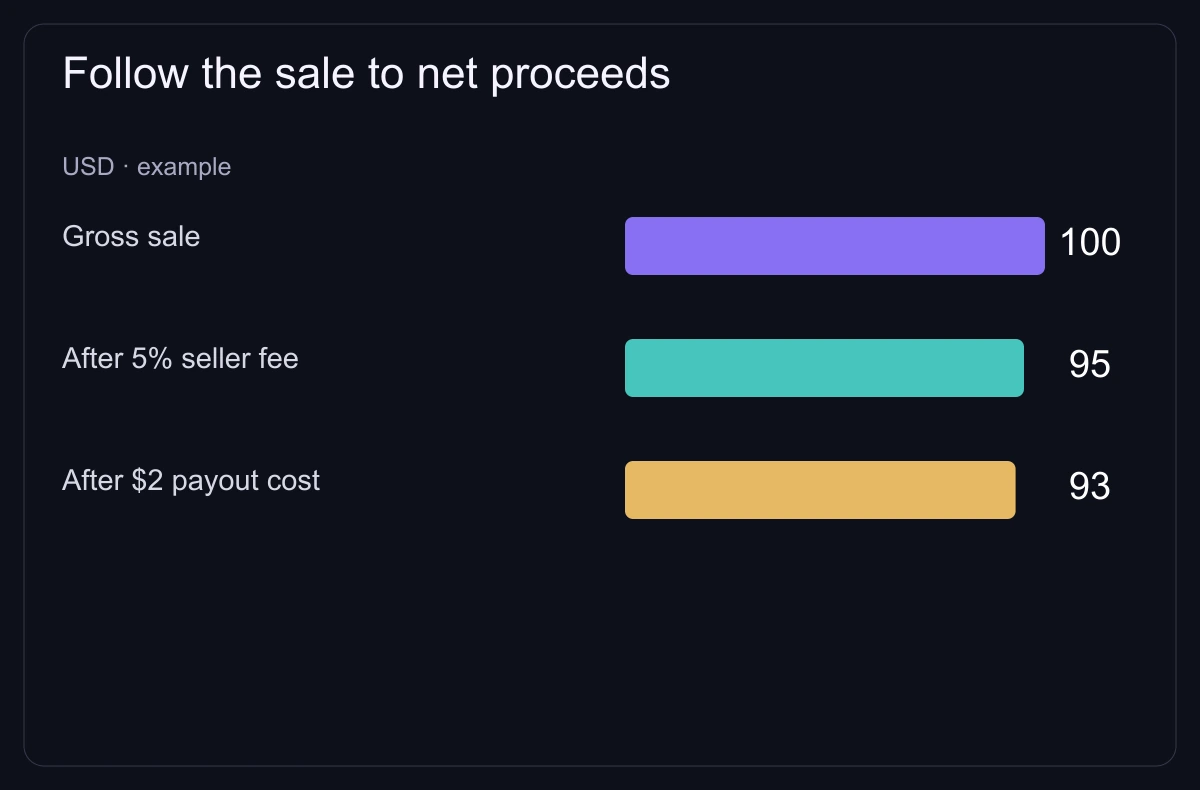
For quantity, suppose ten items could clear as one at $200 and nine at $175. Gross is $1,775, not ten times the best $200 quote. At a 5% selling fee, $1,686.25 remains before payout costs. Inspect demand for the entire basket.
Use the price table to find price differences, the manual fee calculator for one gross percentage plus a fixed cost, and the cashout guide for payout stages. Sequential percentages need separate steps.
Do not send a skin “to confirm your account” or pay an unexplained extra charge to release proceeds. Steam warns that cash promises outside its trade window are unsupported. For account compromise or a mismatched offer, stop and use the trade-safety procedure instead of repeating the transaction.
Listing tiers
Check the applicable sale tier, item custody and payout requirements for a listing.
Open Skinport
Item-specific rate
Check the quoted selling commission and supported payout before valuing an immediate or listed exit.
Open DMarket
Sale and withdrawal stages
Compare the current item quote and payout terms; a historical low fee is not your completed net sale.
Open CSFloatOperator announcement, 18 July 2025: standard 8%, eligible high-value 6%, private 2%; check which tier applies to your sale.
Published/updated: . Read: .
Updated 2 March 2026: usual CS2 selling range 2–10%, separate trade rate; checkout determines your item fee.
Published/updated: . Read: .
22 August 2021 announcement separating selling and withdrawal charges.
Published/updated: . Read: .
Steam does not support cash promises outside its trade window.
Read: .
Some marketplace links are affiliate links.